Bring in real history
Import QFX, OFX, QBO, and CSV statements. Preview every row before it is written and review exact or likely duplicates.
Import your bank and card statements. BaselineLab learns what comes in, what goes out, what repeats, and how money moves between your accounts — then projects every account forward, day by day, up to five years, and tells you the two things that matter: when you'll run short, and how much you'll need.
See how it works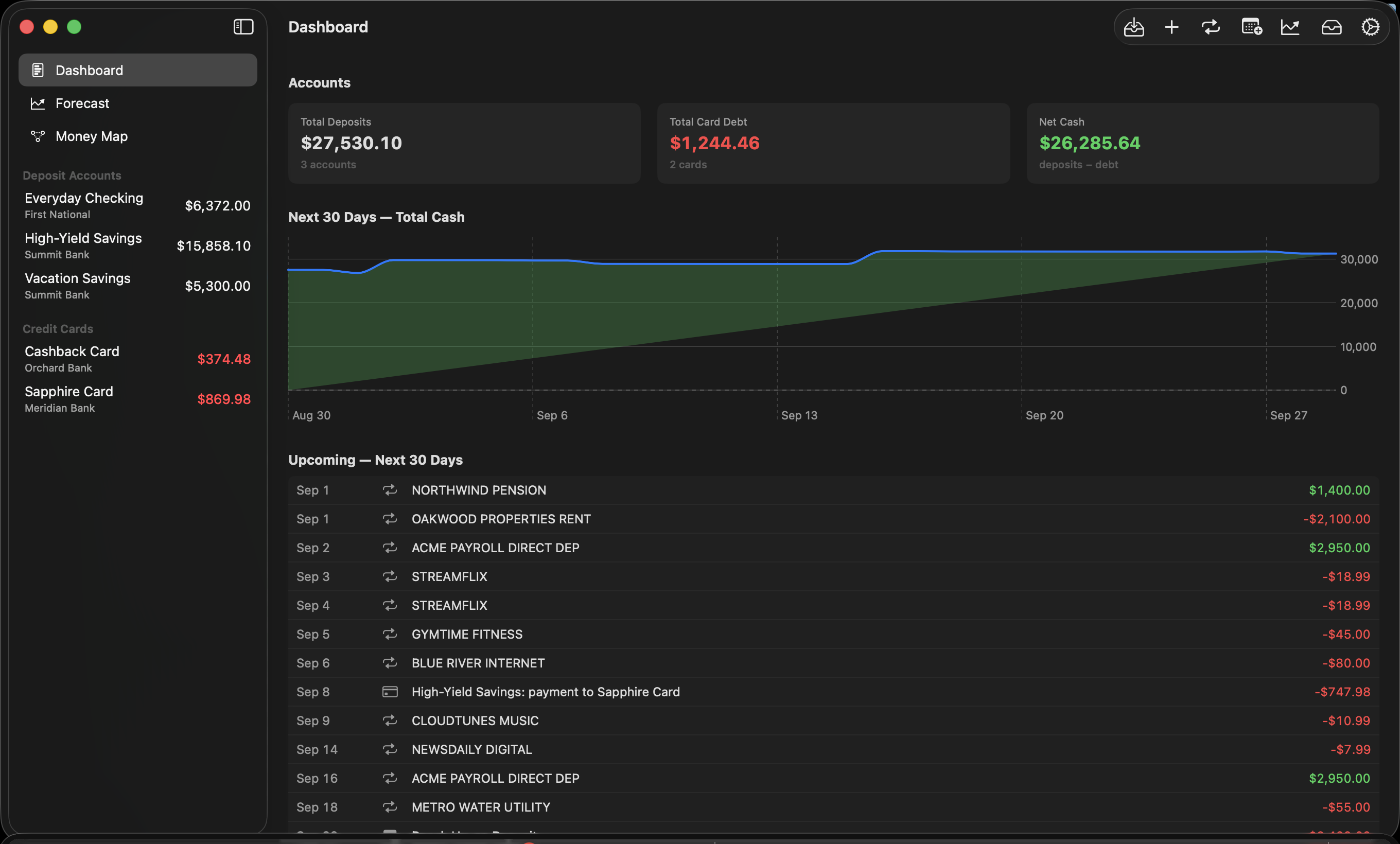
01 — THE IDEA
Most finance tools are good at showing where your money went. BaselineLab’s center of gravity is the future: recurring bills and income, planned events, account-level cash flow, and early shortfall warnings.
Your data lives on your device. When you choose to use iCloud, it syncs privately between your Mac and iPad through your own Apple account—not through BaselineLab servers.
Import QFX, OFX, QBO, and CSV statements. Preview every row before it is written and review exact or likely duplicates.
Confirm recurring bills and income, then map how your money moves — which account pays each card, and the transfers you make on schedule. Add future events history can't know yet.
Project every account up to five years and see when money may run short — and how much more you will need by that date.
Card autopay is modeled the way it really works — statement balances, real closing dates, payments limited by what the funding account actually holds.
THE CASH POOL
Real households move money to where it's needed — so BaselineLab's forecast does too. Accounts cover each other before anything is called short, which means a warning isn't “one account looks scary.” It means the whole plan is short — and the warning tells you how much more you'll need, by what date.
BASELINELAB WARNING Need $620 more by August 8.That's a BaselineLab warning: a date, an amount, and time to do something about it.
02 — THE ACTUAL APP
Every image below comes directly from BaselineLab’s demo-data user manual.
03 — THE WORKFLOW
A practical loop for understanding your money: import what happened, confirm the patterns, then see how today’s choices affect tomorrow.
Add exports from your financial institutions to the right accounts.
Confirm recurring bills and income, transfer matches, and future events.
See future cash flow, projected balances, and warnings in context.
04 — PRIVATE BY DEFAULT
BaselineLab stores your financial records on your device. Optional sync uses your private iCloud account between your Mac and iPad. The app does not require a BaselineLab account, send analytics, show ads, or send your financial database to developer-operated servers.
Read the privacy policyBaselineLab never asks for your bank login and uses no third-party aggregator. You import the statement files your bank already gives you.
Export everything at any time — per-account CSVs plus a complete snapshot of your data. Nothing is held hostage.
05 — QUESTIONS, ANSWERED
The full illustrated user manual ships with BaselineLab — and you can read it now.
BaselineLab is for Mac and iPad (macOS 15+, iPadOS 18+), with private iCloud sync between them. There is no iPhone version at launch.
No — by design. You import the statement files your bank already provides (QFX, OFX, QBO, or CSV). That means no bank passwords shared, no third-party aggregator sitting between you and your accounts, and nothing that breaks when a bank changes its login page.
QFX, OFX, QBO, and CSV — every bank and card issuer offers at least one of these from its statement or activity page. Imports are previewed row by row, with duplicate detection, before anything is saved.
No. Buy it once, use it. No account to create, no monthly fee.
On your device. If you sign in to iCloud, it syncs privately through your Apple account between your Mac and iPad — BaselineLab operates no servers and receives none of your data. You can export everything (CSVs plus a full snapshot) at any time.
Budgeting apps look backward at categories. BaselineLab looks forward at cash: it projects every account day by day, models how your accounts cover each other, and warns you — with a date and a dollar amount — when your plan won't cover what's coming.
COMING SOON
BaselineLab is preparing for release on the App Store for Mac and iPad. Buy it once and keep using it — no subscription required.